
Meeti - The scheduler that
organizes your interviews
within Trimoji.
Meeti combines appointment booking, autonomous candidate selection, and enriched video conferencing. Schedule your exchanges without leaving Trimoji and find the CV, soft skills, questions, and notes all in one place.
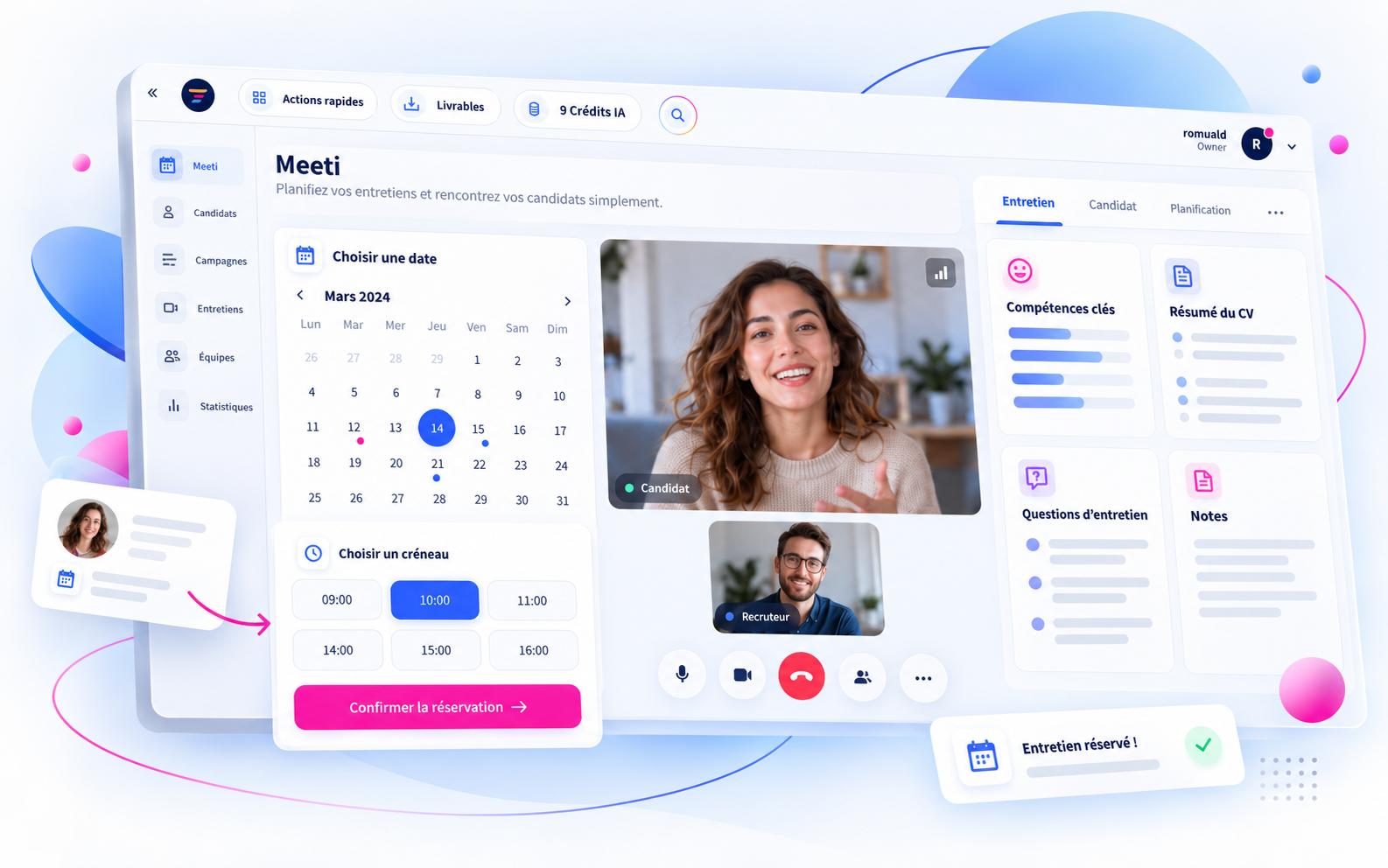
From booking to the interview itself
A tool designed to streamline interview organization and provide recruiters with the right information at the right time.
Synchronized calendar
Set your availability and connect Google Calendar, Microsoft 365, or a private iCal calendar.
Candidate booking
Send a unique link and let the candidate choose from the available slots.
Integrated video
Conduct your interviews directly within Trimoji with candidate information at your fingertips.
Invitation tracking
Track bookings, appointments, and the status of sent emails.
Master your availability without complicating your schedule
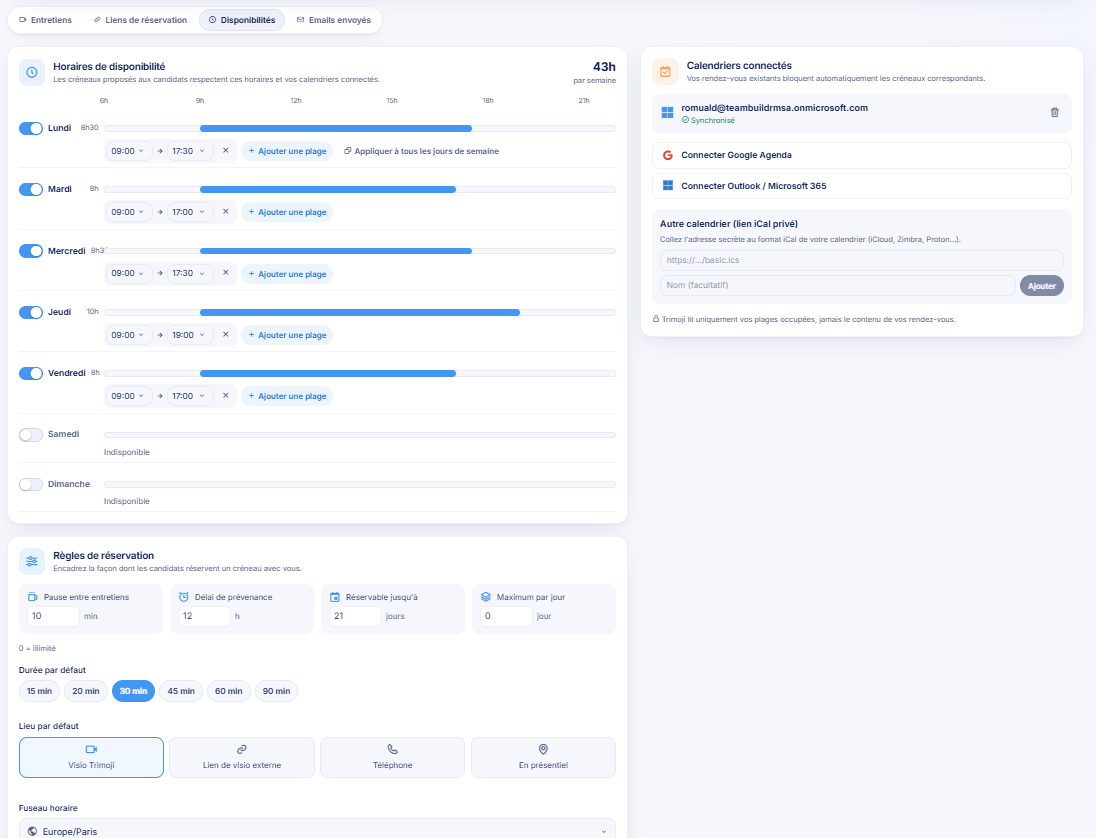
Choose your days and time slots, add break time between appointments, set a notice period, and adjust the default duration of your interviews.
Meeti also takes into account the busy slots in your connected calendars to avoid offering already taken slots.
- Google Calendar, Outlook / Microsoft 365, and private iCal
- Customizable slots for each day
- Configurable duration, notice period, and daily limit
One link, one slot, one scheduled interview
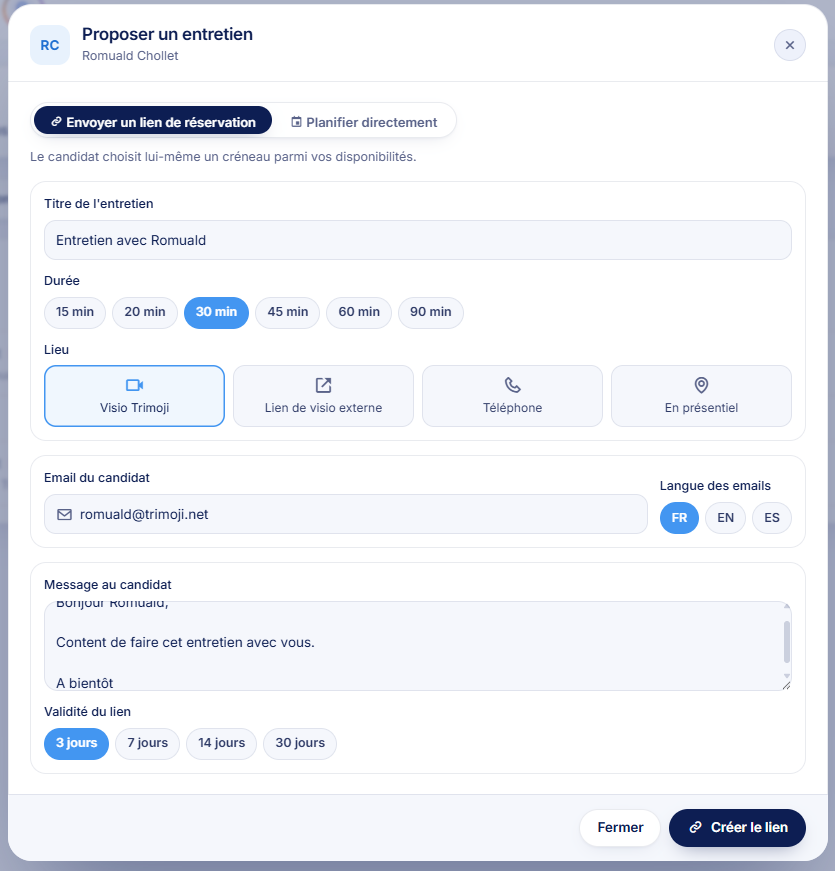
From a candidate's profile in Trimoji, select "Propose an interview". Send a personalized booking link or directly set the appointment date.
The candidate accesses a dedicated page, chooses their slot, and receives a confirmation email with the necessary information to join.
- Invitations in French, English, or Spanish
- Appointment duration from 15 to 90 minutes depending on options
- Meeti video, external video, phone, or in-person
- Individual link valid for 3, 7, 14, or 30 days
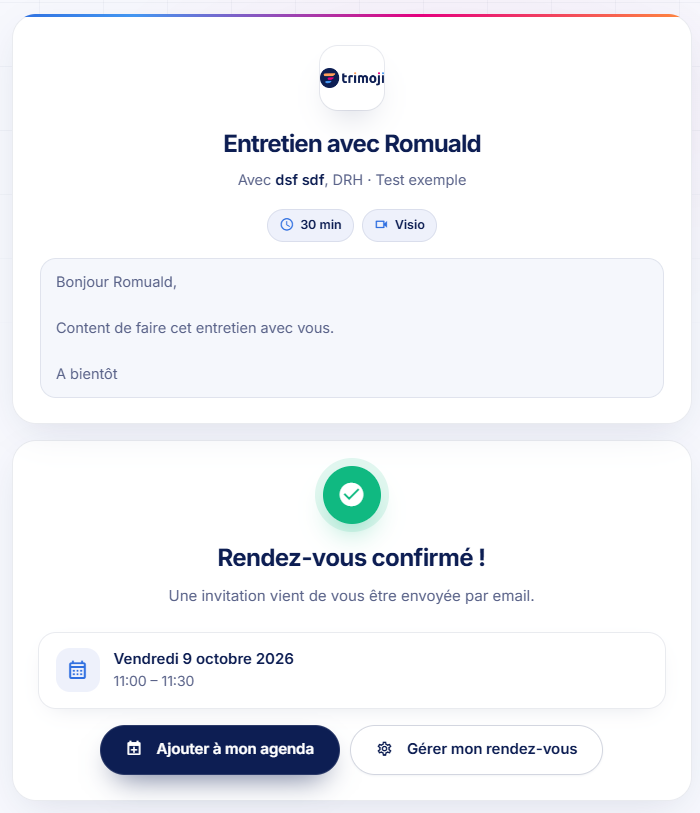
1. The candidate selects their slot
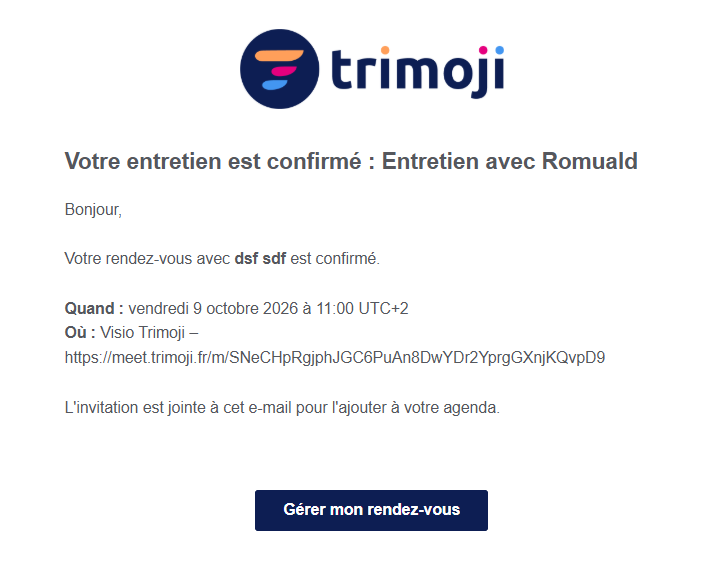
2. The booking is confirmed
More than just video: a prepared, guided, and documented interview
During the exchange, a side panel brings together four sections to help you better understand the candidate and structure the discussion.
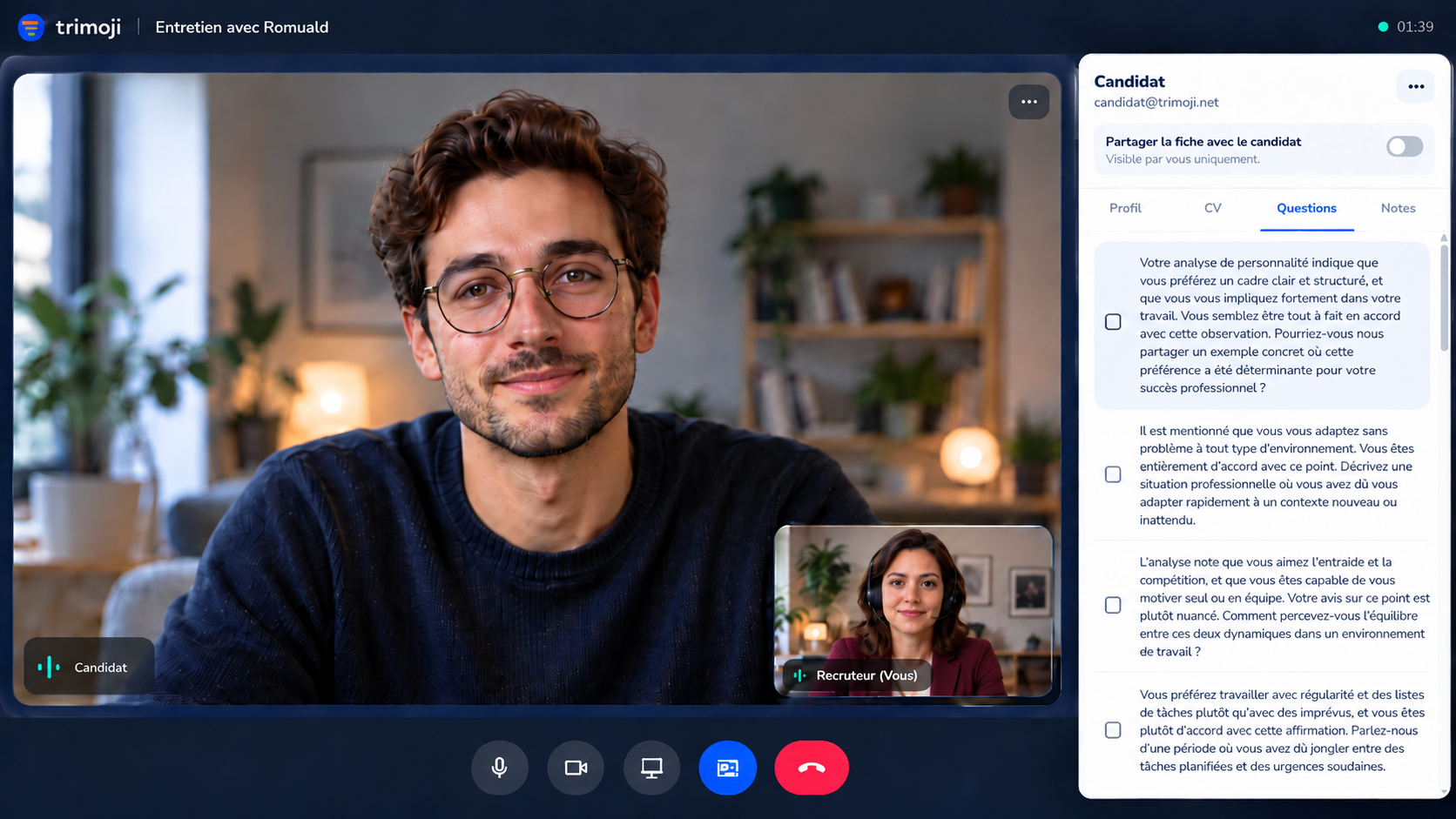
Soft skills profile
A summary to explore the candidate's preferences and professional working style.
CV Summary
Key experiences and background elements to explore further.
Custom questions
Questions to ask, with checkboxes to track the conversation.
Interview notes
A space to record observations and concrete examples.
Analyses and questions are discussion aids: recruitment remains a human decision. Candidate profile sharing is disabled by default.
Keep an overview of your interviews
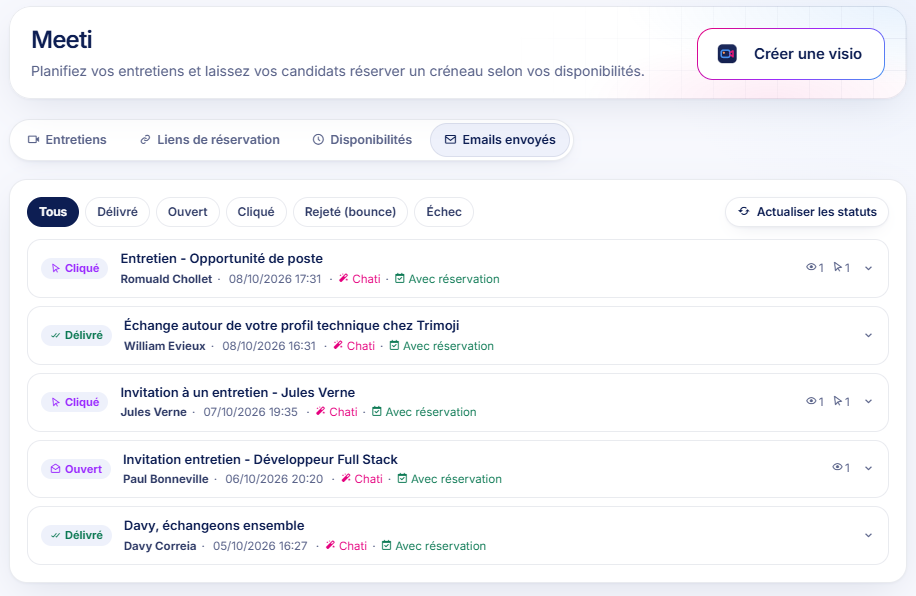
Through the Interviews, Booking Links, and Sent Emails tabs, find your upcoming appointments, already booked slots, and invitation tracking.
- Scheduled, in-progress, completed, or canceled interviews
- Pending or booked links
- Email statuses: delivered, opened, clicked, bounced, or failed
A delivered email is not necessarily read; an opened link does not mean a slot has been booked.
Coherent recruitment, from the desired profile to the interview
Personi
Define the desired profile and the job criteria.
Livi
Analyze the candidate's background and skills.
Evaly
Inform the discussion with soft skills insights.
Meeti
Schedule, meet, and take notes in the same place.
Everything about the Meeti scheduler
What is Meeti?
Meeti is Trimoji's integrated recruitment scheduling and video conferencing feature. It combines a booking scheduler, invitation tracking, and an interview room with candidate information.
How to propose an interview from Trimoji?
Open a candidate's profile, select "Propose an interview," then send a booking link or directly choose a date and time.
Can the candidate choose their slot?
Yes. Via an individual link, the candidate views available slots and confirms the one that suits them.
Can Google Calendar or Outlook be connected?
Yes. Meeti offers connection with Google Calendar, Outlook / Microsoft 365, and a private iCal calendar. Busy slots are taken into account for bookings.
What types of appointments are possible?
You can choose Meeti video conferencing, an external video link, a phone call, or an in-person meeting.
What information is accessible during the video call?
The recruiter can view a soft skills profile summary, a CV overview, custom questions, and a note-taking area.
Can Meeti send attachments to clients or managers?
No. Meeti is for scheduling interviews with profiles in Trimoji. It does not replace an email client for sending attachments to clients or managers.
Do soft skills analyses decide for the recruiter?
No. They serve as aids for preparation and discussion. Conducting the interview and the recruitment decision remain human.
Less time planning.
More time for your candidates.
Discover how Meeti centralizes booking, video conferencing, and candidate information within Trimoji.
Try now ↗