
Trimoji × Jarvi Integration
Automate CV Scoring and Soft Skills Analysis Directly in Jarvi
Transform your Jarvi ATS into a true application analysis and matching assistant with Trimoji's artificial intelligence.
With the native Trimoji × Jarvi integration, automatically analyze your candidates' CVs, identify profiles matching your recruitment criteria, and assess their soft skills, all without leaving your Jarvi environment.
Based on your job description, Trimoji analyzes the skills, experience, and required criteria to assign an explainable match score to each application.
Less manual sorting. More time to connect with the right candidates.
Why connect Trimoji to Jarvi?
An ATS enriched by Artificial Intelligence
Integrating Trimoji with Jarvi automates several stages of candidate analysis while preserving your usual recruitment processes.
Automatic CV Scoring: Each new application associated with a configured job opening can be automatically analyzed by Trimoji. The CV is compared against the criteria defined in your ideal profile, known as a Personi. A matching score appears directly in Jarvi.
Customized Matching to Your Needs: Define the technical skills, experience, education, and other relevant criteria for the position. Trimoji then compares applications against this benchmark to help recruiters identify profiles to review first.
Soft Skills Assessment: From Jarvi, trigger the sending of a Trimoji personality questionnaire to your candidates. This assessment, lasting about 15 minutes, enriches the analysis with insights into professional behaviors, working preferences, and behavioral competencies.
Explainable Results: A score alone is not enough to understand an application. Trimoji provides detailed reports that identify the criteria considered, matching points, and discrepancies between the candidate's profile and the job expectations.
Smoother Recruitment: Automate repetitive tasks, view scores directly in your ATS, and focus your interactions on the most relevant applications. The final decision remains with the recruiter.
How does the Trimoji × Jarvi integration work?
Step 1 - Connect your Jarvi account to Trimoji
The integration is activated via an API connection between the two platforms. From Jarvi, access advanced settings, enable automations, and generate an API key dedicated to Trimoji. Provide this key to the Trimoji support team through a secure channel to finalize the connection. Once the integration is active, you can set up your analysis campaigns.
Step 2 - Create your ideal profile with Personi
In Trimoji, create a Personi that matches the role you wish to fill.
👉 Generate your Personi from a job posting.
👉 Get AI assistance to structure the job criteria.
👉 Define and weight skills, experience, and education.
👉 Configure your candidate filtering criteria.
👉 This benchmark will serve as the basis for CV analysis.
Step 3 - Associate your Personi with a Campaign
Create a Trimoji campaign based on the selected Personi. Configure the assessment settings and link this campaign to your recruitment process in Jarvi. This provides a common benchmark for analyzing applications related to the same search.
Step 4 - Automate CV Scoring in Jarvi
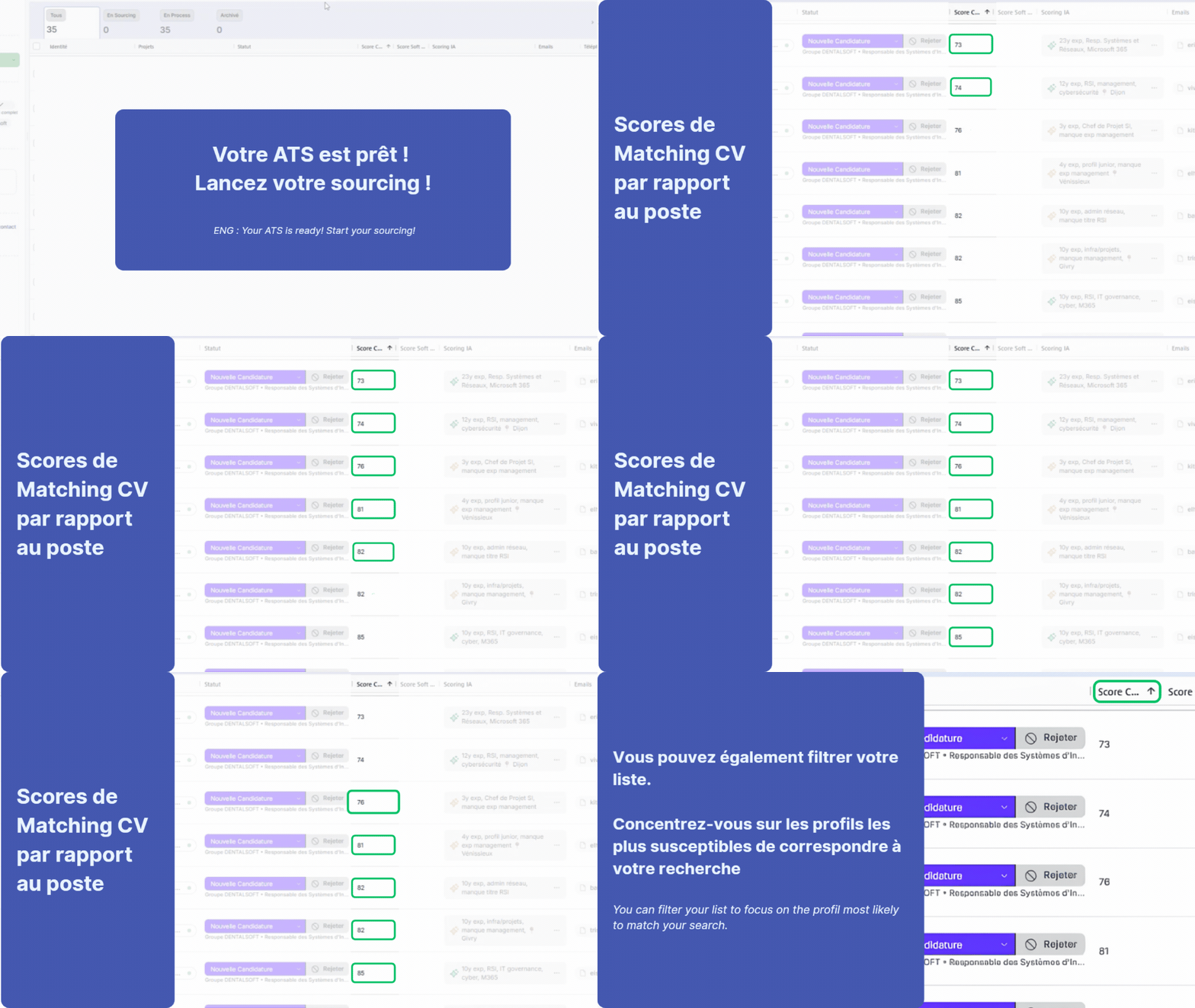
From your Jarvi recruitment project, select the corresponding Trimoji Personi for the role. Incoming applications in the configured process are automatically analyzed. Recruiters can then view matching scores directly in Jarvi, compare applications, and access detailed analyses.
Step 5 - Trigger Soft Skills Assessments
From the Jarvi candidate profile, use the Trimoji automation to send an invitation to complete the personality questionnaire. The candidate receives an email in your company's branding and completes their assessment online. Once the questionnaire is finished, the results enrich the candidate's analysis with soft skills matching and a detailed report.
What results do you get in Jarvi?
CV Matching Score Directly Visible
Visualize the level of match between each application and your job benchmark. The scores facilitate the review of your candidate pool and help prioritize profiles for further consideration, without replacing human assessment.
Detailed Skills Analysis
Access the information used to assess the match with the role: experience, skills, knowledge, and other Personi criteria. This allows you to understand the results and prepare more targeted interviews.
Complementary Personality Assessment
Supplement CV analysis with a soft skills assessment. This approach helps explore how a candidate might function in their future work environment and prepare relevant interview questions.
Actionable PDF Reports
Trimoji generates reports to document analyses, compare profiles, and support discussions between recruiters and managers. The results are decision aids and do not constitute an automatic hiring decision.
Trimoji × Jarvi: More Efficient Recruitment, Without Changing Your ATS
Already using Jarvi to centralize candidates, track opportunities, and manage your recruitment process? With Trimoji, enhance your work environment through automated candidate analysis.
Jarvi organizes your recruitment. Trimoji helps you analyze and compare profiles.
Together, these two solutions allow you to reduce repetitive tasks, standardize candidate evaluation, and dedicate more time to candidate relationships.
Frequently Asked Questions about the Trimoji × Jarvi Integration
Is Trimoji compatible with Jarvi?
Yes. Trimoji has an API integration with Jarvi that allows, among other things, to automate CV scoring, view matching results, and trigger soft skills questionnaires.
Can CVs be automatically analyzed in Jarvi?
Yes. After configuring the Personi and the associated automation for a job opening, incoming applications can be automatically analyzed.
How does CV scoring work in Jarvi?
Trimoji compares the CV information with the Personi criteria defined for the role. A matching score is then available in Jarvi, along with elements to explain the analysis.
Can a personality test be sent from Jarvi?
Yes. A Trimoji automation can be triggered from the candidate profile to send them a personality questionnaire. The candidate receives an email invitation and completes their assessment online.
Do you need to leave Jarvi to use Trimoji?
No, key actions like viewing scores and triggering assessments are accessible from Jarvi. Personi creation and configuration are done within Trimoji.
Does AI scoring replace the recruiter's decision?
No. Scoring serves as an aid for analyzing and prioritizing applications. The recruiter retains responsibility for the assessment and final decision.
How to activate the Jarvi × Trimoji integration?
The integration requires API configuration and enabling Jarvi automations. The Trimoji team can assist you with this setup.
Ready to connect Jarvi and Trimoji?
Automate your candidate analysis and enhance your ATS with CV scoring and soft skills assessment.